Home Tools Blog About Contact Open PDF Editor
Advanced In-Browser Document Editing

Free Online PDF Editor — No Sign-Up, No Watermarks

Edit PDF text, add images, sign documents, and annotate — all free in your browser. No account, no downloads, no watermarks. Your files stay 100% private on your device.

100% Private Instant Processing No Watermarks Works on All Devices

Drop your PDF here

Drag & drop your PDF file, or browse to select

— or —

Max 50 MB · Processed locally in your browser · No server uploads

Advanced Text Editing

Modify existing layers directly

Precision Alignment

Retain perfect structural layout

High-Fidelity Export

Download without watermarks

Local Processing

Zero data leaves your browser

How to Modify Existing PDF Text Online

Leverage our high-performance rendering engine to manipulate text layers directly in your browser.

1

Load the Document

Drag and drop your PDF. Our engine immediately processes the file and maps all text blocks, making them instantly selectable.

2

Modify Text Content

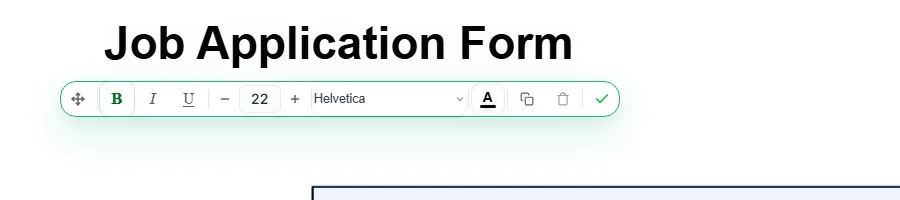
Select the specific text you wish to change. Use the floating property bar to adjust font families, precise sizing, colors, or layout alignment.

3

Export Updated PDF

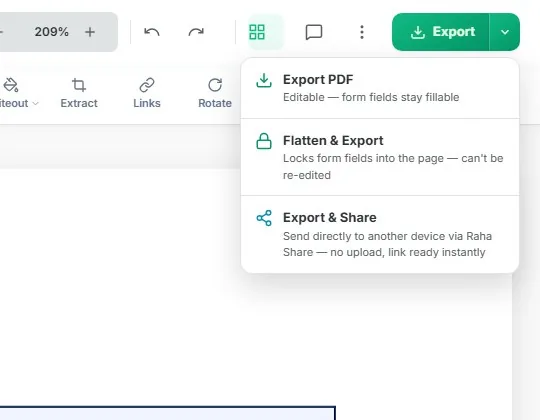
Click Export to generate the final document. All structural formatting is preserved with zero quality degradation or watermarking.

Engineered for Advanced Text Editing

We built an editor that manipulates exact document metrics directly inside your device's memory.

Zero Data Exposure

Every operation runs entirely within your browser using advanced local processing. Your files are never transmitted to any server, ever.

Instant & Offline-Ready

No loading spinners waiting for a server. Your local CPU processes the PDF in milliseconds.

Pixel-Perfect Output

Fonts, layouts, and formatting are preserved identically. What you see is exactly what you get when you export.

Works on Any Device

Whether you're on an iPhone, Android phone, tablet, or desktop — the editor adapts to your screen perfectly.

Always Free

No premium tiers. No watermarks on exports. No "3 files per day" limits. 100% free, no strings attached.

No Account Needed

Open the page, upload your PDF, and start editing immediately. No email, no registration, no hassle.

Solve Specific PDF Editing Problems

Our professional engine handles complex formatting issues that other editors fail to fix.

PDF Text Not Editable?

Our editor identifies the text layer and makes it interactive. Even if the text is locked or improperly encoded, we help you reconstruct it for editing.

Use Fix Tool →

Text Color & Layer Issues

Fixing "white text" or invisible layers is easy. Change font colors, opacity, and layers instantly with our color precision tool.

Fix Text Color →

Formatting & Alignment

Fix broken formatting or misaligned text after editing. Our editor preserves the original coordinate system for perfect alignment.

Align Text →

The Ultimate PDF Editor For Professionals & Casuals

Expertly engineered to solve the most frustrating PDF problems. Whether you're at a desktop correcting business contracts or on an iPhone fixing a last-minute typo, Raha Tools delivers a natively integrated, lag-free experience without downloading a single app.

100% Mobile-Native Experience

We know that in 2026, most urgent document editing happens on phones. Unlike legacy PDF editors that break or zoom weirdly on mobile, Raha Tools features a completely bespoke, touch-first mobile interface. Your iPhone or Android device instantly pulls up a perfectly scaled Annotate Dock and integrates directly with your system's default keyboard for typing. No app store downloads required.

Why Do Traditional PDF Editors Fail?

Many online PDF tools are built on outdated technology. They force you to upload your highly sensitive documents to a remote cloud server, making you wait in queues, exposing you to data breaches, and returning severely compressed files.

The Local Processing Advantage: Raha Tools uses a next-generation local processing engine. When you open a PDF, your own device's CPU handles the editing algorithms locally. This guarantees absolute privacy, zero server downtime, and instantaneous text formatting updates that legacy tools simply cannot match.

True Text Reconstruction

Don't just add white boxes over old text. Our engine parses the original font families, weights, and metrics, allowing you to seamlessly select text, pull up your keyboard, and type as if it were a standard word processor.

Unrestricted HD Exports

Sick of hitting a paywall right as you try to export? This editor is permanently free. When you click Export, your locally-processed PDF is generated at its exact original DPI resolution with absolutely no intrusive watermarks.

The Best Free PDF Editor on Mobile

If you're searching for a truly free pdf editor on mobile, look no further. Our smart layout ensuring that when you align text or sign a page, the precise geometry is mathematically preserved flawlessly on iPhone, iPad, and Android.

Frequently Asked Questions

Why does Google say my PDF is uneditable, but Raha Tools can fix it?

If a PDF is generated as a flattened image (like a scan) or has malformed character encoding, standard readers lock it. We offer advanced text layer extraction specifically built to combat corrupted formatting, allowing you to edit text color, alignment, and content even when other suites fail.

Does this actually work well on smartphones and tablets?

Yes. A major focus of Raha Tools is full mobile parity. Whether you are using Safari on iOS or Chrome on Android, you get a dedicated mobile dock, touch-optimized handles, and native keyboard integration. Editing a PDF on your phone is no longer a last-resort nightmare; it's a premium feature.

How do I ensure my document remains confidential?

We solve security concerns structurally: by not having a server upload process at all. Everything you do on this page runs as a private sandboxed application in your browser. Disconnect your WiFi after the page loads; you'll see the editor still works perfectly. That's true privacy.

Ready to edit your first PDF?

Start in seconds — no sign-up, no downloads, no cost.

Start Editing Free