How to Edit PDF on Mobile
(Free & No App Needed)
Stop fighting with clunky apps. Learn how to modify text, add signatures, and annotate any PDF directly in your mobile browser in seconds.
Editing PDFs on mobile is frustrating. Most apps are slow, require expensive subscriptions, or take up precious storage space on your phone. Even worse, many mobile PDF tools break your document's formatting, leaving you with a mess that looks unprofessional. Raha Tools' PDF editor runs entirely in your mobile browser instead — no app install, no subscription.
Whether you're on an iPhone or Android, you shouldn't need to install a heavy app just to fix a typo or sign a contract. In this guide, we'll show you how to use Raha Tools to edit PDFs online for free, with zero installation and 100% privacy.
Quick Answer: The Best Way to Edit PDF on Phone
The fastest way to edit a PDF on mobile is using a browser-based tool like Raha Tools PDF Editor. Simply open your browser, upload your file, and start editing. No signup, no app downloads, and free to use.
Start Editing NowThe Problem: Why Traditional PDF Apps Fail
If you've ever tried to "Edit PDF on phone" using a standard app, you've likely run into these common pain points:
- Storage Bloat: Professional PDF apps can take up 200MB+ of space.
- Account Walls: Many tools force you to create an account before you can even see your file.
- Hidden Costs: "Free" apps often watermark your documents or charge for basic text editing.
- Formatting Issues: Mobile apps often fail to render complex fonts and layouts correctly.
How to Edit PDF on Mobile (Step-by-Step)
Follow these five simple steps to modify any document directly on your smartphone.
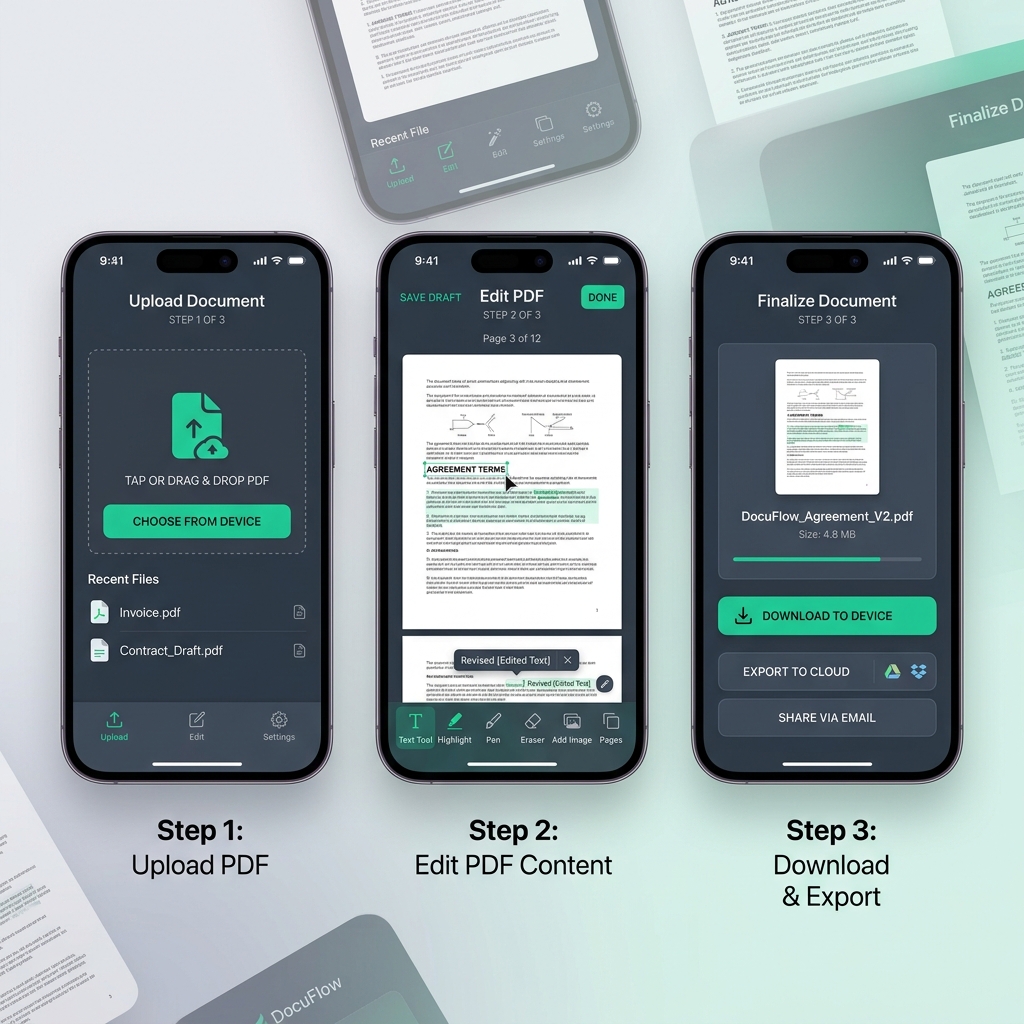
Step 1: Access the Online Editor
Open Safari (iPhone) or Chrome (Android) and navigate to the Raha PDF Editor. Since our tool is web-based, it works perfectly on any modern smartphone without needing an App Store visit.
Step 2: Upload Your Document
Tap the "Upload" button and select your PDF from your phone's files, iCloud, or Google Drive. Our tool supports encrypted files and large documents up to 100MB.
Step 3: Modify Text and Images
Tap on any existing text to change it. Our engine automatically detects the font and style to ensure your edits look original. You can also move images, add new ones, or redact sensitive information.
Step 4: Add Signatures and Annotations
Need to sign a contract? Use the Sign tool to draw your signature directly on the screen with your finger or a stylus. You can also use the Mark tool to highlight important sections with a smooth highlighter brush.
Step 5: Export and Share
Once you're happy with the results, tap 'Export'. Your document is flattened and downloaded instantly to your device. You can then email it or share it via WhatsApp or Slack.
Ready to edit your first file?
Upload your PDF below and start editing instantly. No strings attached.
Upload PDF to EditorBrowser vs. Desktop & Apps: Which is Better?
In 2026, browser-based tools have finally caught up to desktop software. Here's why you should choose an online editor over a mobile app:
| Feature | Raha Tools (Browser) | Traditional Apps |
|---|---|---|
| Installation Needed | No | Yes |
| Privacy (Local Processing) | Yes | Often No |
| Free Text Editing | Yes | Rarely |
| Works on all Devices | Yes | Device Specific |
Pro Tips for Professional Mobile Editing
To get the most out of your mobile editing experience, keep these tips in mind:
1. Use Landscape Mode for Complex Tables
If your PDF has wide tables or complex layouts, rotating your phone to landscape mode provides more horizontal space for precise adjustments.
2. Leverage the Property Bar
Our mobile interface features a floating property bar. Use it to fine-tune text size, colors, and opacity without navigating away from your document view.
3. Secure Your Documents
If you're editing sensitive documents, don't forget to check out our guide on how to protect PDF files using AES-256 encryption.
Frequently Asked Questions (FAQ)
Can I edit a PDF on my iPhone for free?
Yes. You can use the built-in Files app for basic annotations, but for full text editing and professional signatures, a tool like Raha Tools is required. It's free to use and works directly in Safari.
How do I edit PDF text on Android without an app?
Simply open your mobile browser (Chrome is recommended), go to RahaTools.com, upload your PDF, and tap on the text you wish to modify. It's that simple.
Is it safe to edit PDFs online?
With Raha Tools, it's 100% safe. We use client-side processing, meaning your file stays in your browser and is never uploaded to our servers. Your privacy is our priority.
Can I merge PDFs on mobile too?
Absolutely. You can use our PDF Merge Guide to learn how to combine multiple files into one on your phone.
Start Editing Like a Pro
No app to install — open your browser and start editing in seconds.
Open Free PDF Editor