How to Edit PDF Online Free
(No Signup & No Watermark)
Need to fix a typo, swap an image, or sign a document instantly? Discover the ultimate guide to professional browser-based PDF editing with 100% data privacy.
Professional PDF editing shouldn't cost $15/month. For years, document editing was locked behind expensive enterprise software or "free" online tools that slapped ugly watermarks on your work or forced you to create an account before downloading. Raha Tools' free online PDF editor was built to remove all three of those obstacles at once — this guide walks through exactly how to use it.
In 2026, the technology has changed. You can now modify PDF text, reformat pages, and add elements directly in your browser with pixel-perfect accuracy. Whether you're a student fixing a thesis or a professional updating a contract, this guide will show you how to master online PDF editing without ever leaving your browser tab.
Quick Solution: Edit Your PDF Right Now
If you're in a hurry and just want to fix your document, use the Raha Tools PDF Editor. It's free to use, requires no signup, and processes everything locally on your device for maximum security.
Open Editor & Start WorkingThe Pain Point: Why Most PDF Editors Are Frustrating
Most users search for "edit pdf online" because they want to avoid the friction of desktop software. However, the current landscape of online tools often adds more friction:
- Privacy Risks: Most tools upload your sensitive documents to remote servers for processing.
- Formatting Destruction: Changing a single word often shifts the entire layout of the page.
- Font Mismatches: The editor can't find your original font, so it replaces it with a generic one that looks terrible.
- Artificial Limits: Limits on file size, page count, or number of exports per day.
The Solution: 100% Browser-Side Editing
Raha Tools uses a revolutionary Local-First approach. By leveraging WebAssembly (Wasm), we run the entire editing engine inside your browser. Your file never leaves your computer, making it faster and infinitely more secure than traditional "cloud" editors.
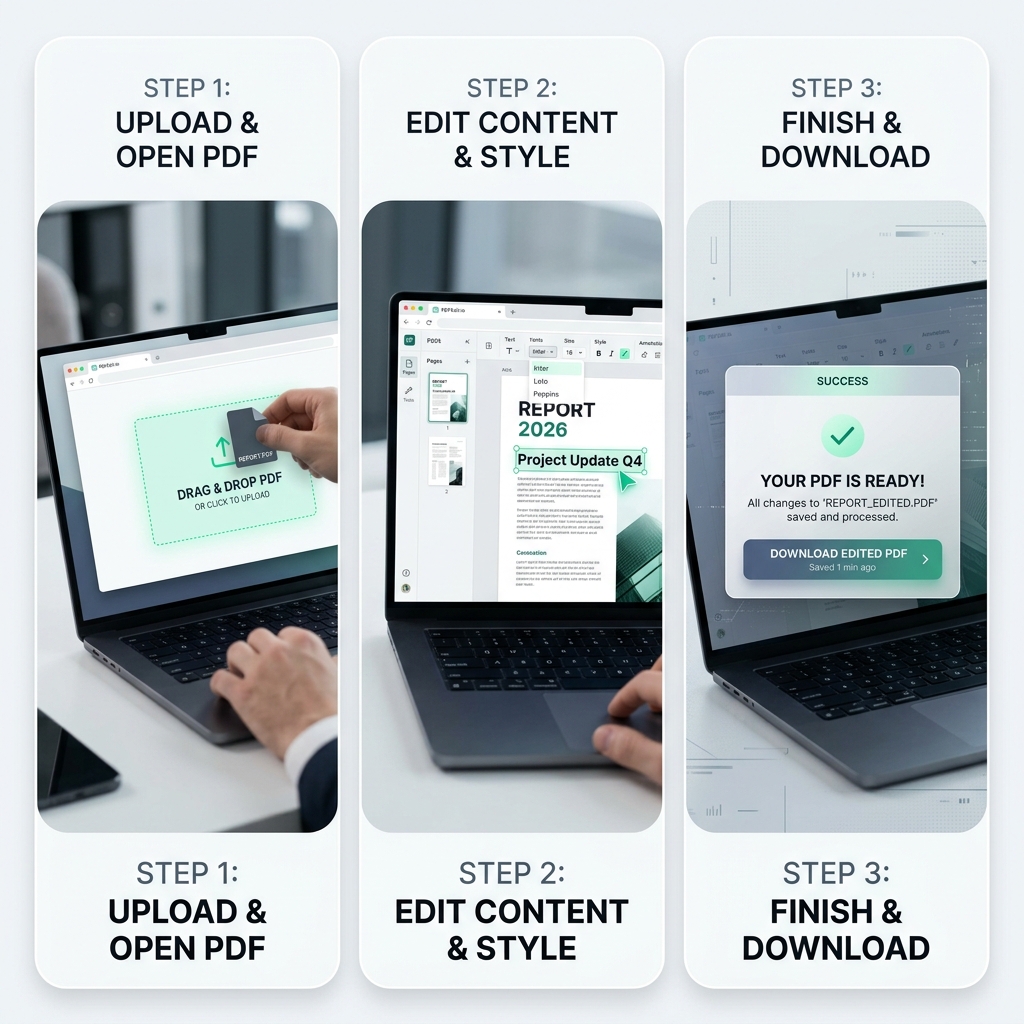
Step-by-Step: How to Edit Your PDF Online
Follow these steps to modify any document with professional results.
1. Upload Your File
Simply drag and drop your PDF into the Raha Editor. Our engine will immediately scan the document's text layers and formatting blocks without any data being sent to our servers.
2. Select and Modify Text
Click on any text element. A floating property bar will appear, allowing you to change content, adjust font size, change colors, or toggle bold/italic styles. Our engine matches your original font automatically to ensure edits are invisible.
3. Add Images and Signatures
Need to add a logo or a digital signature? Use the 'Add Object' tool to place images or draw your signature with your mouse or touchscreen. You can resize and reposition elements with pixel precision.
4. Annotate and Highlight
For document reviews, use the Mark tool to highlight key sections. Our "Smooth-Path" technology ensures that your highlights look like real pen strokes, not jittery digital lines.
5. Export with Formatting Preserved
Hit 'Export' to flatten your changes and download a high-fidelity PDF. Because we use native PDF coordinate mapping, your file will look identical on every device, from iPhones to high-end workstations.
Raha Tools vs. The Competition
Why choose our platform over industry giants or other free alternatives? Here's the data:
| Criteria | Raha Tools | Traditional Online Tools | Adobe Acrobat |
|---|---|---|---|
| Cost | Free Forever | Limited Free / Paid | $14.99+/mo |
| Privacy | Local (Private) | Cloud (Public) | Cloud Sync |
| Signup Required | No | Often Yes | Yes |
| Watermarks | None | Often Added | None |
Advanced Tips: Fix Common PDF Issues
Sometimes, simply editing text isn't enough. Here is how to handle more complex document challenges:
Fixing Non-Editable Scanned PDFs
If your PDF is a scan, the text isn't "real"—it's an image. Check out our Fix Non-Editable PDF Guide to learn how to reconstruct the text layer using OCR-like logic.
Handling Large File Sizes
High-quality PDFs can be massive. If your edited file is too big for email, use our PDF Compression Guide to shrink it by up to 80% without losing visual quality.
Combining Multiple Documents
If you need to add pages from another document, our Merge PDF Guide explains how to combine multiple files into one continuous PDF before you start editing.
Frequently Asked Questions
Can I edit PDF text online for free without a watermark?
Yes. Raha Tools allows full text and image editing with zero watermarks. We believe professional tools should be accessible to everyone, which is why we don't charge for basic or advanced editing features.
Is it safe to upload my PDF to an online editor?
With Raha Tools, you don't actually "upload" in the traditional sense. Since we use browser-side processing, your file stays on your machine. This makes it the safest option for sensitive legal or financial documents.
How do I edit a PDF if I don't have the original font?
Our editor includes an "Intelligent Font Matcher" that analyzes the characters in your document and matches them to a similar system font or an embedded alternative, ensuring your edits blend in seamlessly.
Can I edit PDFs on my phone?
Absolutely. Check out our dedicated guide on how to edit PDF on mobile for touch-optimized tips and tricks.
Stop Searching, Start Editing
No sign-up, no watermarks, no files uploaded to a server — just open the editor and start.
Get Started for Free