Which Languages Does
Raha PDF Editor Support?
If you don't type in English, the first question is a fair one: will this actually work for me? Here's the honest, complete answer, every language it supports for typing and editing, every language it doesn't yet, and why OCR follows a different set of rules entirely.
Raha PDF Editor supports typing and editing text in 42 languages, across five writing systems: Latin, Cyrillic, Greek, Arabic, and Japanese. That covers most of Europe, Latin America, Southeast Asia, Central Asia, and every major Arabic-script language, including full right-to-left support for Arabic, Persian, Urdu, Pashto, Kurdish, and Sindhi. A smaller set of languages, mostly ones with their own unique scripts like Chinese, Korean, Hindi, and Thai, isn't supported yet for typing new text. The rest of this post breaks down exactly where your language falls.
Just want to check your language?
Use Ctrl+F on this page and search for your language's name. If it's not listed anywhere below, it isn't supported for typing yet, but see the note on reading existing PDFs further down.
Open PDF EditorHow This Actually Works
When you type or edit text in a PDF, the editor draws that text using one of a small set of bundled fonts rather than whatever font happens to be installed on your computer. That's what makes it consistent across every device, but it also means language support comes down to which letters those specific fonts actually contain. A language only makes the list below if its full character set, including accented and extra letters, was checked directly against the font files, not just assumed from "the font supports Latin script" style claims.
Latin-Script Languages (28)
This is by far the largest group, and it's not limited to plain A to Z. Every language below includes its specific accented characters (ñ, ü, ç, ø, and so on), verified individually.
| English | Spanish | French | German |
| Italian | Portuguese | Dutch | Polish |
| Turkish | Czech | Romanian | Hungarian |
| Swedish | Norwegian | Danish | Finnish |
| Icelandic | Croatian | Slovak | Slovenian |
| Estonian | Latvian | Lithuanian | Albanian |
| Indonesian | Malay | Filipino | Swahili |
Cyrillic-Script Languages (6)
Standard Slavic Cyrillic is fully covered.
| Russian | Ukrainian | Belarusian |
| Serbian | Macedonian | Bulgarian |
Central Asian Cyrillic variants, Kazakh, Kyrgyz, and Tajik, aren't supported yet, since they use extra letters beyond standard Slavic Cyrillic that fall outside the current font.
Greek
Modern Greek is supported, including accented (tonos) vowel forms.
Arabic-Script Languages (6), With Real Right-to-Left Support
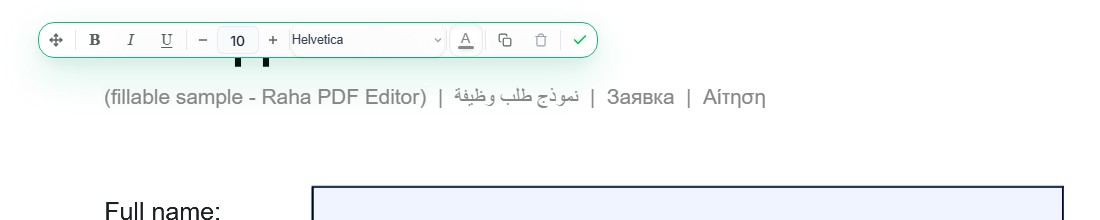
This is the most technically involved part of the editor's language support, and the screenshot above is proof it's not just theoretical. Arabic text is rendered with genuine contextual letter shaping, meaning each letter takes the correct visual form depending on its position in a word, and the whole line flows right-to-left automatically, even when it's mixed with Latin text in the same sentence.
| Arabic | Persian (Farsi) | Urdu |
| Pashto | Kurdish (Sorani) | Sindhi |
Persian, Urdu, Pashto, Kurdish, and Sindhi all share the Arabic script but add their own extra letters on top of it, letters like پ, چ, ژ, گ, ٹ, ڈ, ڑ, and dozens more. Rather than assume those would just work, we checked the bundled Arabic font directly for each one. All of them are present.
Japanese
Typing and editing Japanese text is supported, covering the 2,136 official Joyo Kanji, the government-defined common-use set that covers general prose and everyday writing, plus full Hiragana, full Katakana, and Japanese punctuation. That's a large, deliberately-scoped set rather than an attempt at exhaustive coverage: rare kanji outside the Joyo list, the kind mostly found in proper nouns, place names, or specialized and classical text, aren't covered yet. Typing one of those shows the same on-screen warning as any other unsupported character, rather than failing silently. Chinese and Korean are not yet supported.
What Happens If You Type an Unsupported Language?
You won't get silently broken or missing text. Before drawing anything, the editor checks your text against the available fonts, and if it finds characters that aren't covered, it shows an on-screen warning that names the specific characters involved. You'll know immediately if something won't render correctly, instead of finding out after you've already exported and sent the file.
Languages Not Yet Supported for Typing
Vietnamese, Hebrew, Chinese, Korean, Hindi, Thai, Bengali, and the Cyrillic-script forms of Kazakh, Kyrgyz, and Tajik. If your language is in this list, typing new text with the editor's tools isn't reliable yet.
One important distinction: this limit is about typing new text. If you open a PDF that already contains Chinese, Hindi, or any other language, you can read it completely normally, since that's just your browser displaying content that's already in the file. The font limitation only applies when the editor itself has to draw brand-new characters into the page.
OCR Uses a Different Language List Entirely
It's easy to assume "language support" means one thing across the whole site, but OCR, reading text out of a scanned document, is a completely separate feature with its own rules. The one-click Make text editable shortcut inside the PDF editor's More Tools menu currently reads English only. If your scanned document is in another language, that shortcut isn't the right tool.
Instead, use the standalone PDF OCR tool, which lets you choose the document's language before scanning it, and covers considerably more ground than the editor's own font list does:
| English | Spanish | French | German |
| Portuguese | Italian | Dutch | Arabic |
| Hindi | Russian | Chinese (Simplified) | Japanese |
Worth noting: OCR only makes existing scanned text selectable and searchable. It doesn't change which languages you can type new text in afterward, that's still governed by the five scripts described above.
Frequently Asked Questions
Does Raha PDF Editor support my language?
It supports 42 languages across five writing systems: Latin, Cyrillic, Greek, Arabic, and Japanese. This covers most of Europe, Latin America, Central Asia, and the Arabic-script languages (Arabic, Persian, Urdu, Pashto, Kurdish Sorani, and Sindhi). Chinese, Korean, Hindi, Thai, Bengali, Hebrew, and Vietnamese are not yet supported for typing new text.
Does it support Arabic and other right-to-left languages?
Yes. Arabic is fully supported with correct right-to-left rendering and proper contextual letter shaping, and it handles lines that mix Arabic and Latin text correctly. Persian, Urdu, Pashto, Kurdish Sorani, and Sindhi are also supported, since they share the Arabic script and their extra letters are included in the bundled font.
Does it support Japanese?
Yes. It covers the 2,136 official Joyo Kanji (the government-defined common-use set), plus full Hiragana, Katakana, and Japanese punctuation. Rare kanji outside the Joyo set, mostly proper nouns and specialized terminology, aren't covered yet and are flagged with an on-screen warning. Chinese and Korean are not yet supported.
What happens if I type a language it doesn't support?
The editor checks your text against the available fonts before drawing it. If any characters aren't covered, it shows an on-screen warning naming the specific characters, rather than silently dropping or corrupting them.
Can I still open and read a PDF written in an unsupported language?
Yes. The language limits described here apply to typing or editing new text with the editor's tools. Opening and reading a PDF that already contains text in any language works normally, since that's just the browser displaying the file's existing content.
Is OCR available in other languages too?
OCR has its own, separate language list. The one-click Make text editable shortcut inside the PDF editor currently reads English only. For other languages, use the dedicated PDF OCR tool, which supports English, Spanish, French, German, Portuguese, Italian, Dutch, Arabic, Hindi, Russian, Chinese (Simplified), and Japanese.
For a quick-reference version of this same list, laid out by script, see PDF Editor Language Support.
